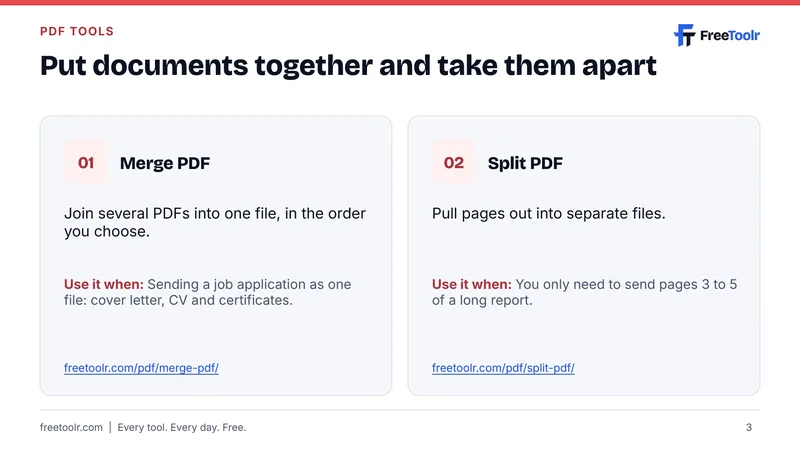
Merge PDF
Join several PDFs into one file, in the order you choose.
Use it when: Sending a job application as one file: cover letter, CV and certificates.
Your free Workspace New
Get an email and a browser alert before your domain, hosting or subscriptions renew.
Your Workspace New
Renewal reminders, favourites and saved results in one free place.
Free slides, 2026
Merge, split, compress, convert and sign PDFs. No upload, no account.
No sign-up. Free under CC BY 4.0, so you can share it or use it in a class or team talk with credit to FreeToolr.
Make a PDF small enough to email or upload.
Use it when: A job or exam portal rejects your file for being too large.
Turn phone photos of pages into one PDF.
Use it when: You photographed a signed form and need to send it as a PDF.
Turn a PDF into an editable Word document.
Use it when: You need to change the text instead of retyping it.
Add your signature without printing and scanning.
Use it when: A landlord or employer sends an agreement to sign today.
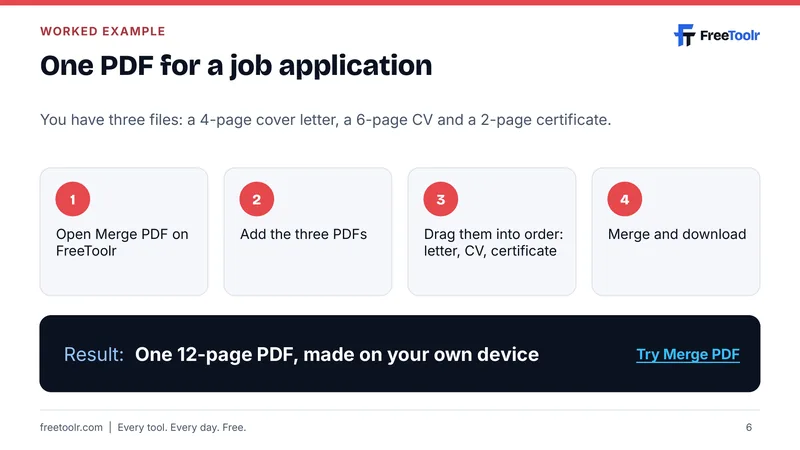
You have three files: a 4-page cover letter, a 6-page CV and a 2-page certificate.
Result: One 12-page PDF, made on your own device. Try Merge PDF
10 slides, every tool linked, free to share.
 12 Free Online Calculators for Everyday Maths
 12 Free Tools Every Student Needs
 Free Money Tools for the US, UK, Nigeria and the Gulf
 12 Free Developer Tools That Run in Your Browser
 Free SEO Audit Checklist: 12 Checks and the Tools to Fix Them Free ebook Free Online Tools for Your Daily Life 22 pages, a guide to 1,000+ free tools.
We and Google use cookies to show ads, including personalised ads, and to learn which tools help most. Reject to turn them off; every tool works either way. See our cookie policy and privacy policy.
Your free Workspace Get reminders before your domain, hosting or subscriptions renew, and keep your favourite tools in one place.